Hey there! So I’ve been experimenting with AI coding agents for design work lately, and I wanted to share what I actually found when I put different models to the test. No hype, just real results from a real experiment.
Part 1: OpenCode — The Terminal-Based Coding Agent
What Is OpenCode?
OpenCode is an open-source AI coding agent that lives in your terminal, IDE, or desktop. Think of it as an AI pair programmer that you can summon with a keyboard shortcut.
At its core, OpenCode is a Go-based application with a rich Terminal User Interface (TUI). It lets you interact with AI models to write code, debug issues, refactor, and even design UI components — all from the command line.
Why Terminal-Based Agents Matter
You might wonder: why use a terminal agent for design work? Here’s what I’ve found:
- Privacy-first: OpenCode doesn’t store your code or context data on remote servers. Everything happens locally.
- Speed: No GUI overhead means faster interactions.
opencode run "Build a dashboard"is faster than opening an IDE. - Multi-session: Start multiple agents in parallel on the same project.
- Shareable sessions: Create public links to any session for collaboration or debugging.
- IDE agnostic: Works in VS Code, Cursor, terminal, and as a desktop app.
Key Features for Design Work
- LSP enabled: Automatically loads the right language servers for intelligent code completion
- Multi-session agents: Run multiple agents in parallel — one for design, one for backend
- GitHub integration: Authenticate with GitHub to use Copilot tokens
- Any model support: Connect Claude, GPT, Gemini, Qwen, Kimi, or any model from 75+ providers
- MCP server support: Extend with custom tools via the Model Context Protocol
- Agent skills: Create and manage custom agents with tailored system prompts
The OpenCode Ecosystem
OpenCode isn’t just a CLI tool. It’s an ecosystem:
- TUI (Terminal UI): Full interactive terminal experience
- Web IDE: Access from any browser
- Desktop app: Beta available on macOS, Windows, and Linux
- IDE extension: VS Code, Cursor, and any terminal-supporting editor
- Agent framework: Create custom agents with
/agent create
Part 2: Pencil — Design as Code with MCP
What Is Pencil?
Pencil is a design tool that flips the traditional design workflow on its head. Instead of designing in a separate tool and then handoff-ing to developers, Pencil lets you design inside your code editor and land directly in code.
The core philosophy: Design on canvas. Land in code.
The .pen Format and Design-as-Code
Pencil uses a .pen file format — a code-native representation of design layouts. This means:
- Design files live in your project repository
- Version control your designs alongside your code
- AI can read, modify, and generate designs programmatically
- No more “where’s the latest Figma?” confusion
MCP Integration — The AI Connection
Pencil’s killer feature is its deep Model Context Protocol (MCP) integration. The Pencil MCP server runs locally and gives AI assistants the ability to:
- Read your
.penfiles - Modify existing designs
- Generate new design components from natural language
- Apply design tokens and style guides
Supported AI Assistants:
- Claude Code (CLI and IDE)
- Cursor IDE
- Windsurf IDE (Codeium)
- Codex CLI (OpenAI)
- Antigravity IDE
- OpenCode CLI
Example Workflow
# 1. Start Pencil and open a .pen file
pencil design.pen

# 2. In Claude Code, ask for design changes
claude
# "Create a login form with email and password"
# "Add a navigation bar to this page"
# "Design a card component for my design system"

# 3. AI uses MCP tools to modify the .pen file
# 4. Changes appear on the canvas immediately
Pencil vs Traditional Design Tools
| Feature | Pencil | Figma/Sketch | Traditional Handoff |
|---|---|---|---|
| Live in IDE | Yes | No | N/A |
| AI-modifiable | Yes (via MCP) | Limited | No |
| Version controlled | Yes (git) | Yes (cloud) | No |
| Design → Code | Direct | Plugin needed | Manual |
| Privacy | Local-only | Cloud-hosted | Local |
It is free to use for now so I just went ahead with it.
Part 3: The Experiment — Testing 6 Models on the Same Design Task
Alright, here’s where it gets interesting. I wanted to see how different AI models actually perform when given the exact same design task. No cherry-picking, no special prompting — just raw capability comparison.
The Setup
I ran all models through OpenCode with the Pencil MCP and gave them this prompt:
Use pencil MCP, in the "./designs/chatbot-[model].pen" file, add the following features:
- Create a header section with company name "Fin Doc Analyzer" on the left and login/logout buttons on the right
- Create a chat history section on the left which shows past chats
- Create a document viewer section in the center which shows the uploaded financial pdf document
- Create a chat bot section in the right which allows the user to ask questions about the uploaded document.
The Models Tested
Local Models (Running on RTX 3090 via llama.cpp)
| Model | Parameters |
|---|---|
| Qwen 3.5 | 27B (Dense) |
| Qwen 3.6 | 35B (MoE) |
| Gemma 4 | 26B (MoE) |
| Gemma 4 | 31B (Dense) |
Cloud Models
| Model | Provider |
|---|---|
| Kimi K2.5 | Moonshot AI |
| Claude Sonnet 4.6 | Anthropic |
| Kimi K2.6 | Moonshot AI |
Part 4: The Results — And Honestly? The Local Models Struggled
Let me show you what each model actually produced, because the difference between cloud and local was pretty stark.
Cloud Models
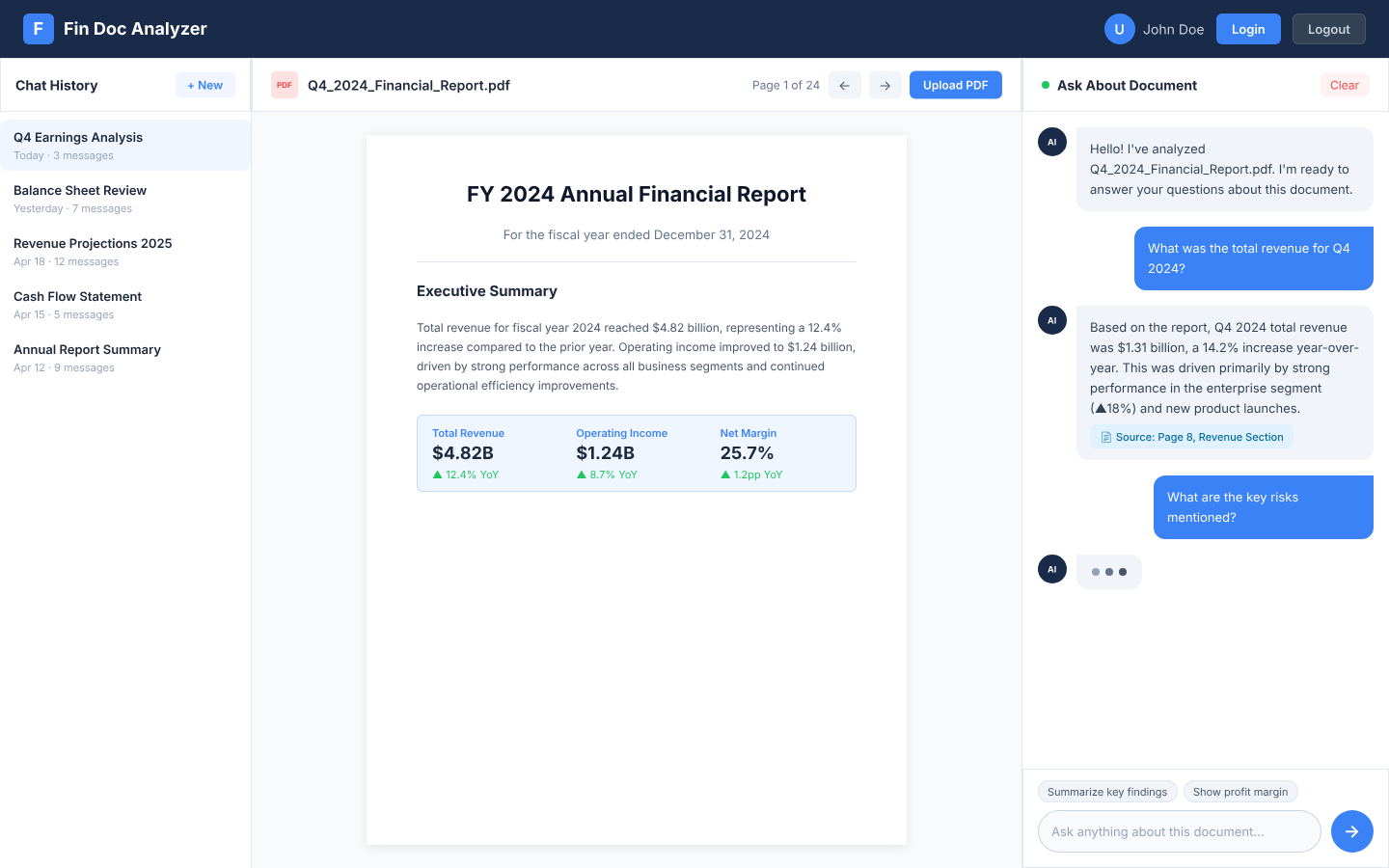
Claude Sonnet 4.6 — The Clear Winner
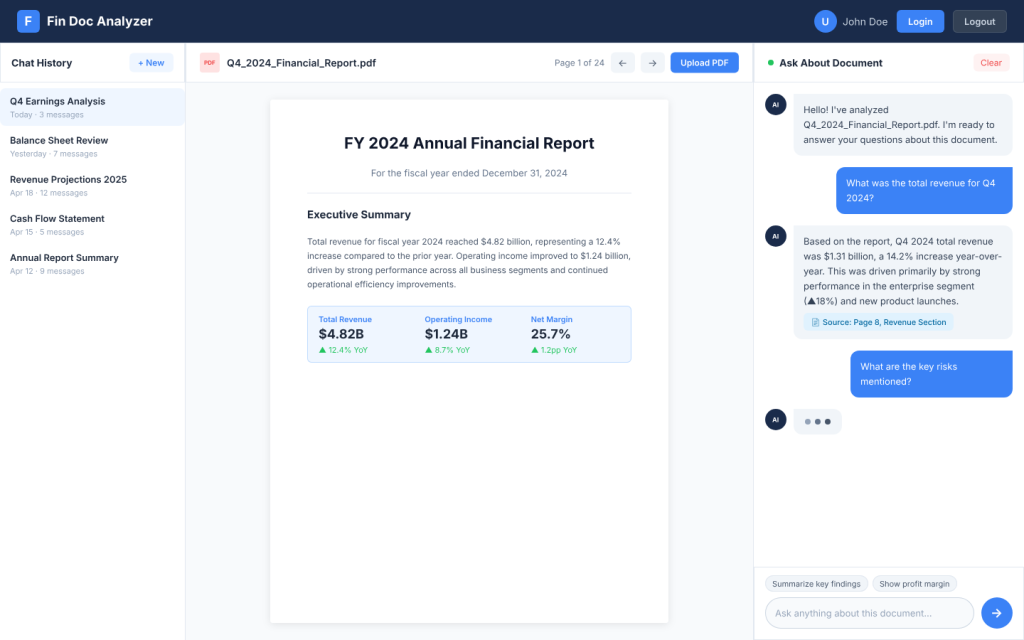
What I got:
- Professional dark navy header with a branded icon (not just text)
- Detailed chat history sidebar with 5 different chat items, timestamps, and message counts
- Document viewer with an actual PDF preview showing financial content
- Chat interface with proper message bubbles, user avatar, and input field
- Consistent spacing, shadows, and visual hierarchy throughout
This felt production-ready. The attention to detail was impressive — things like the “+ New” button in the sidebar, the user avatar with initials, the subtle shadows on the PDF container. It just looked polished.
Kimi K2.5 — Solid and Professional
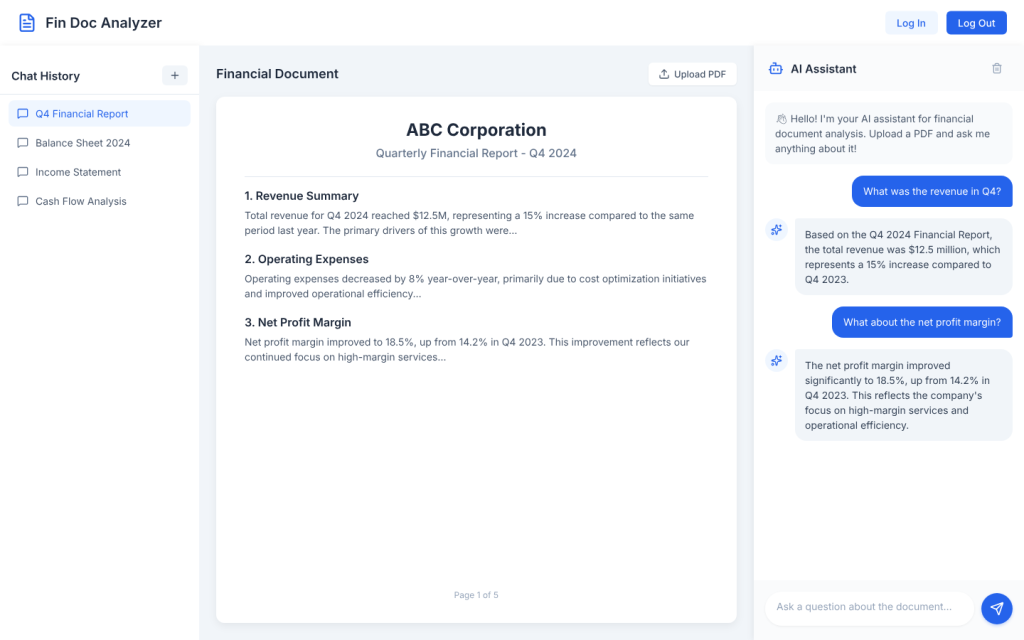
What I got:
- Clean white header with a document icon next to the company name
- Chat history with icons for each item and a “+ New Chat” button
- Document viewer with upload button and a detailed PDF preview
- Chat section with message bubbles
Honestly, this was nearly as good as Claude. The design was clean, modern, and functional. The use of icons in the chat history was a nice touch that Claude didn’t even have.
Kimi K2.6 — Surprisingly Disappointing
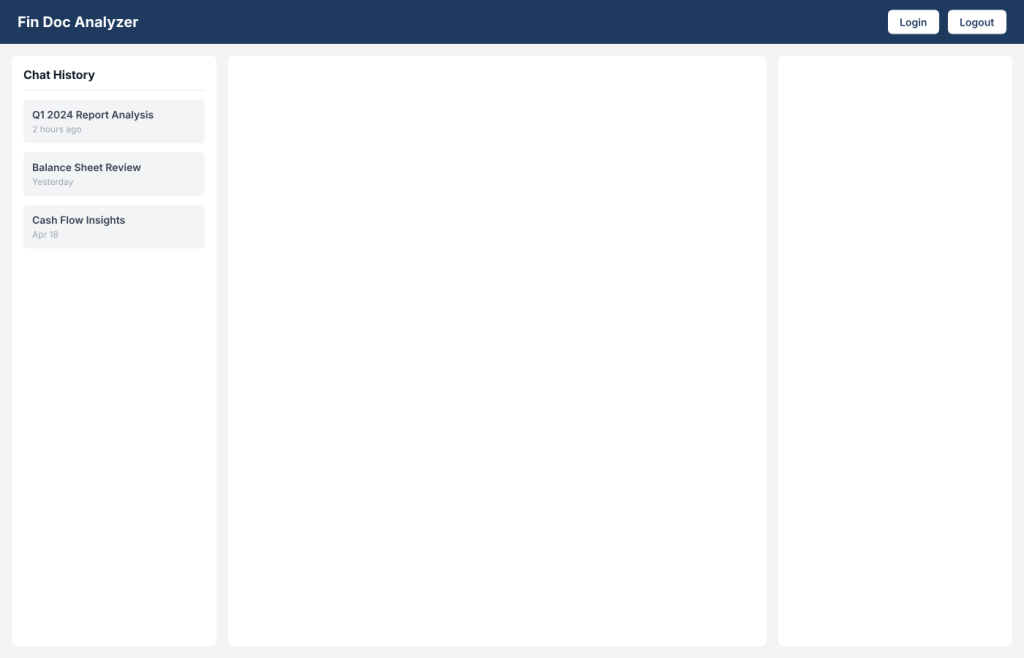
Okay, I expected K2.6 to be better than K2.5, but… it wasn’t. At all.
What I got:
- Dark blue header (decent)
- Basic chat history with minimal styling
- Document viewer that was just a placeholder with an emoji — no actual PDF content
- Chat section that looked okay but nothing special
The whole thing felt like a step backward. Less detail, less polish, less everything. The document viewer was especially weak — just a gray box with an emoji instead of actual content. I was genuinely surprised given how good K2.5 was.
Local Models
Now here’s where things got rough. I wanted local models to work well — who doesn’t want private, free AI design? — but the results were pretty disappointing across the board.
Qwen 3.5 (27B) — The Best of a Bad Bunch
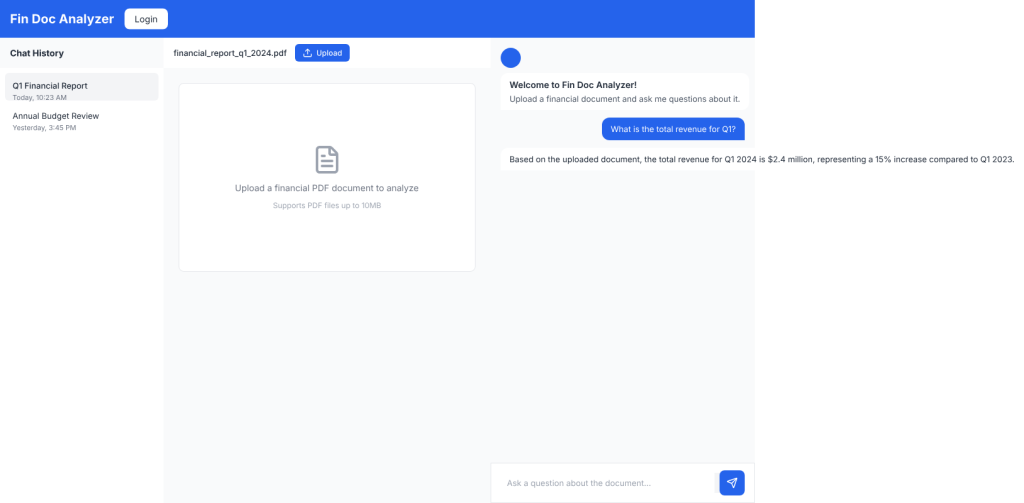
Surprisingly, the dense Qwen model actually performed the best among local models.
What I got:
- Blue header with the company name
- Chat history sidebar with actual items and timestamps
- Document viewer with an upload button (with icon!) and a proper placeholder
- Chat section with welcome message, user message, and bot response
- Even had things like the send button with an icon
Don’t get me wrong — this wasn’t as polished as the cloud models. The spacing was off, the colors were basic, and it lacked the refined details. But structurally? It was complete. All four sections were there and functional.
Qwen 3.6 (35B MoE)
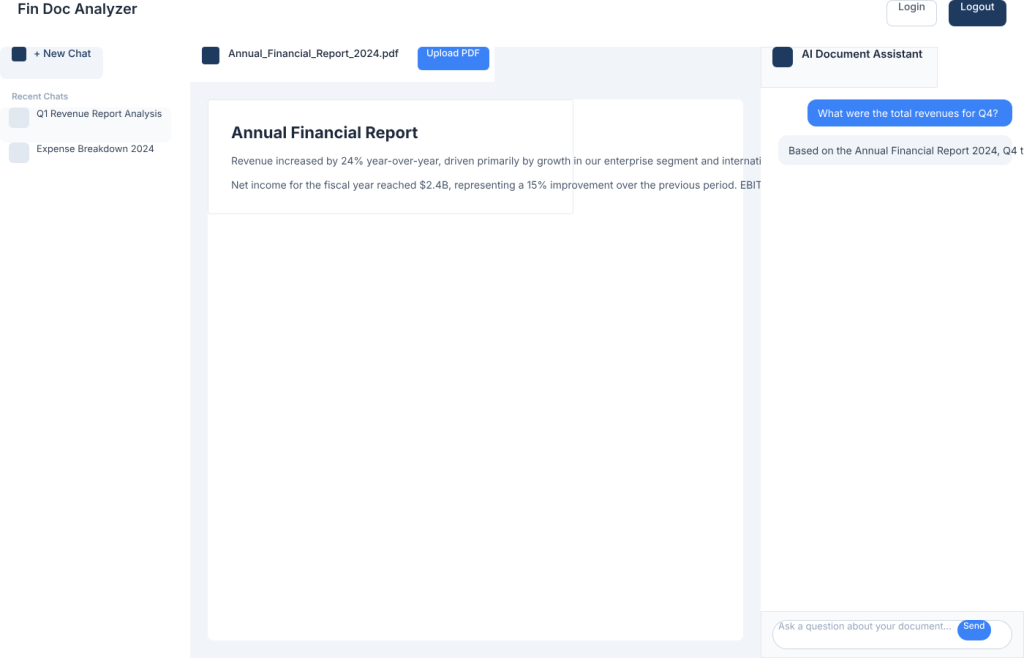
This was confusing. MoE model, worse output.
What I got:
- White header with basic login/logout buttons
- Chat history with a “+ New Chat” button (nice touch)
- Document viewer with actual PDF content (impressive!)
- Chat section that was… incomplete
The main elements are there but the spacing was way off.
Gemma 4 (31B) — Slightly Better, Still Weak
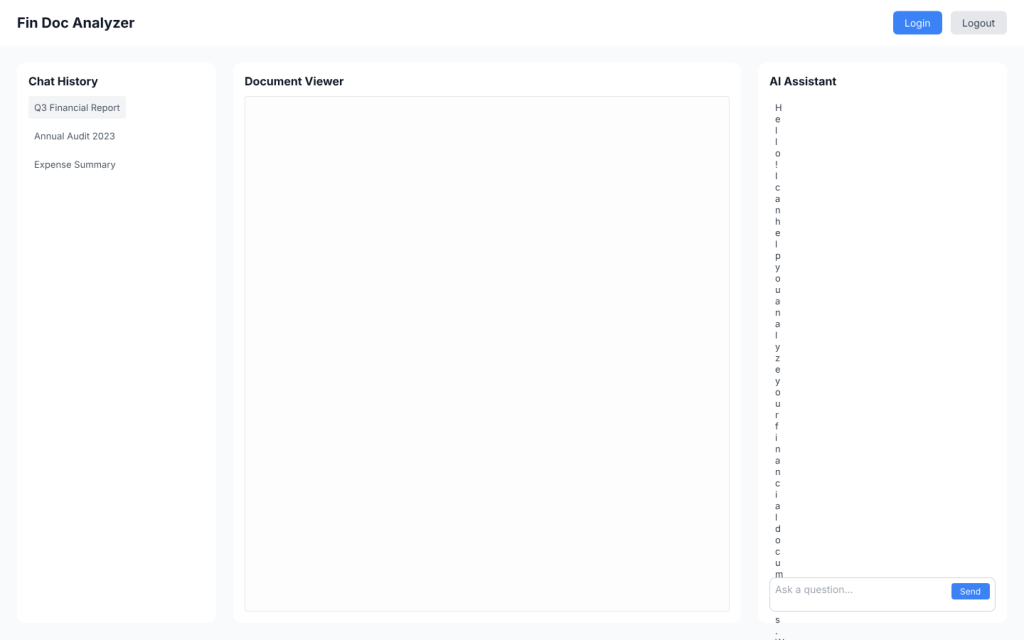
The bigger Gemma was better than the 26B MoE version, but still not great.
What I got:
- Header with actual button frames for login/logout
- Chat history in a card-style container with items
- Document viewer that was just a labeled rectangle — still no real content
- Chatbot section with messages and an input field
It had less detail, fewer features, and just felt less complete. The document viewer was especially disappointing — just an empty box labeled “Document Viewer.”
The local models were not that great as the cloud models. I suspect part of the reason might be that the verification process (via pencil screenshot) did not work that well. I will need to dig into the session transcripts to verify this.
Part 5: Design Evaluation — Let’s Get Real About the Scores
I needed a way to objectively score these, so I created an evaluation framework based on what actually matters for a UI design:
Evaluation Framework
| Criteria | Weight | What I Looked For |
|---|---|---|
| Layout Structure | 25% | Are all 4 required sections present and correctly arranged? |
| Visual Hierarchy | 20% | Is it clear what’s important? Good information architecture? |
| Color & Typography | 20% | Consistent colors? Readable text? Professional look? |
| Component Detail | 20% | Are buttons actual buttons? Icons present? Real content? |
| Spacing & Alignment | 15% | Proper padding, margins, things lining up correctly |
The Scores (And My Honest Assessment)
| Model | Layout (25) | Visual (20) | Color/Typo (20) | Detail (20) | Spacing (15) | Total |
|---|---|---|---|---|---|---|
| Claude Sonnet 4.6 | 25 | 19 | 19 | 19 | 14 | 96/100 |
| Kimi K2.5 | 25 | 18 | 18 | 18 | 13 | 92/100 |
| Kimi K2.6 | 23 | 15 | 15 | 12 | 11 | 76/100 |
| Qwen 3.5 (27B) | 24 | 14 | 14 | 14 | 10 | 76/100 |
| Qwen 3.6 (32B) | 20* | 15 | 15 | 15 | 11 | 76/100 |
| Gemma 4 (31B) | 22 | 13 | 13 | 11 | 9 | 68/100 |
What These Scores Mean
Claude Sonnet 4.6 is in a league of its own. It’s the only one that felt truly production-ready.
Kimi K2.5 is excellent value — nearly Claude-level quality for a fraction of the cost.
Kimi K2.6 was genuinely disappointing. I expected it to beat K2.5, but it was noticeably worse.
Qwen 3.5 is the local model winner, but that’s a low bar. It’s “okay” — not great.
Gemma 4 (both sizes) just wasn’t competitive.
Part 6: My Recommendations After All This Testing
For Professional Design Work
Use Claude Sonnet 4.6. Yes, it’s more expensive, but the quality difference is real. When you’re building something for production, the polish matters.
Kimi K2.5 as a budget alternative. If you need to cut costs, K2.5 gets you 90% of Claude’s quality at about 25% of the price. Just skip K2.6 — it’s worse for some reason.
For Privacy-Conscious Work
Qwen 3.5 (27B) is your best bet. It’s not amazing, but it’s the most complete of the local options. You get all four sections, functional components, and a design that won’t embarrass you.
Don’t bother with Gemma 4. Both sizes produced underwhelming results. The 26B was too minimal, and the 31B wasn’t much better.
The Hybrid Workflow I’m Actually Using
After all this testing, here’s what I’m doing in practice:
Avoid → Kimi K2.6, Gemma 4 (any size), Qwen 3.6 (incomplete output)
Exploration & Drafting → Kimi K2.5 (cheap, fast, good enough)
Production Polish → Claude Sonnet 4.6 (when it needs to look professional)
Privacy-Sensitive Projects → Qwen 3.5 local (accept the quality trade-off)
Part 7: The Bottom Line
So what did I learn from all this?
Cloud models are still significantly better for design work. The gap isn’t closing as fast as I’d hoped. Local models are usable for drafts and personal projects, but they’re not ready for professional design work yet.
The “good enough” threshold is real. For internal tools or quick prototypes, Qwen 3.5 local is genuinely fine. For customer-facing products, it’s worth paying for Claude or Kimi K2.5.
The tools are here, they’re usable, and they’re getting better. Part 2 is incoming
Tested in April 2026 on an RTX 3090 with llama.cpp for local models. All designs generated using the same prompt via OpenCode with Pencil MCP.
Design files, screenshots and session transcripts can be found here